
Complete Your Google Business Profile: 6-Step Checklist for Connecticut Business Owners
Most Connecticut business owners have claimed their Google Business Profile. Very few have actually completed it.
Claiming your profile takes five minutes. Optimizing it is what most people never get around to. And today, that gap matters more than ever.
In our first post, we explained how AI search is changing the way customers find local businesses. In our second post, we covered the five signals AI checks before recommending any business.
Google Business Profile optimization sits at the center of almost all of them.
These six steps can be completed yourself and will make a measurable difference to how both Google and AI platforms understand your business.
Why Your Google Business Profile Is More Important in 2026
Your Google Business Profile is no longer just another directory listing.
It has become one of the primary sources ChatGPT, Claude, Google AI, and other AI platforms use when answering questions about local businesses.
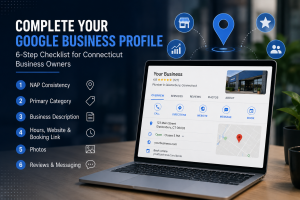
Here’s How AI Uses It
- If someone asks AI to recommend a plumber in Glastonbury, it often checks the Google Business Profile before visiting the company’s website.
- Incomplete information lowers trust and reduces your visibility.
- Unverified businesses are far less likely to be recommended.
The Numbers Speak for Themselves
| Statistic | What It Means |
|---|---|
| 64% of consumers use Google Business Profile to find contact details. | Your profile is often the very first impression customers receive. |
| Businesses with complete profiles are viewed as significantly more trustworthy. | Completeness is a trust signal for both people and AI. |
| Profiles with photos receive substantially more clicks and customer interactions. | Visual content directly increases engagement. |
Now let’s look at the six steps.
Step 1. NAP Consistency
Your Name, Address, and Phone Number Must Match Everywhere
NAP stands for Name, Address, and Phone Number.
These three pieces of information must be identical everywhere your business appears online—not similar, but exactly the same.
AI cross-checks this information across multiple websites. Even small inconsistencies reduce confidence.
Common Problems
- Your Google Business Profile says “Suite 4B” while your website says “Ste 4B.”
- Your Yelp listing formats the phone number differently.
- An old address still exists on a directory.
- Your business name is abbreviated on some websites.
How to Check
Search your business name on Google. Visit every listing on the first page and verify that your name, address, and phone number exactly match your Google Business Profile.
Step 2. Primary Category
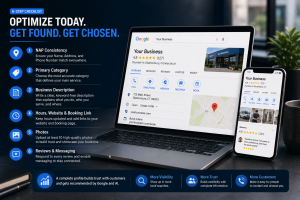
The Most Important Field in Your Entire Profile
Your primary category tells Google and AI exactly what type of business you operate.
Choosing a category that is too broad dramatically reduces your chances of appearing in relevant searches.
| Too Broad | Too Specific | Best Choice |
|---|---|---|
| Contractor | Residential Electrical Rewiring | Electrician |
| Health | General Medical Care | Pediatric Dentist |
| Food | American Food | Pizza Restaurant |
Select the category that best describes what customers hire you to do most often. Additional services can always be added as secondary categories.
Step 3. Business Description
250 Words That Tell AI Everything It Needs to Know
Your business description is one of the few places where you can clearly explain who you are in your own words.
A strong description answers five questions.
- What do you do? Explain your services clearly.
- Who do you serve? Mention your ideal customers.
- Where do you work? Include towns, cities, and counties.
- Why choose you? Mention experience, certifications, or specialties.
- How can customers get started? Include a simple call to action.
Avoid keyword stuffing. AI understands natural language. Write the way you would explain your business to a customer.
Step 4. Hours, Website, and Booking Link
The Fields Most Businesses Forget
Many Connecticut businesses are missing one or more of these basic fields.
- Business Hours: Keep them current, including holiday hours.
- Website Link: Link to the most relevant page instead of only the homepage.
- Booking Link: Connect your scheduling system whenever possible.
AI increasingly prefers businesses that provide customers with a direct path to taking action.
Step 5. Photos
Upload at Least 10 Photos
Businesses with photos receive more clicks, direction requests, and customer engagement.
Photos also tell AI that your business is active and legitimate.
Recommended Photos
- Exterior of your business
- Interior
- Your team
- Completed projects or before-and-after photos
- Vehicles, equipment, or tools
Upload at least ten quality images before waiting for customer photos to appear.
Step 6. Reviews and Messaging
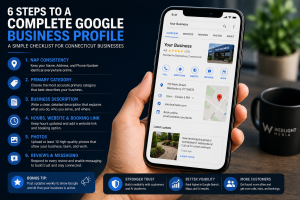
Unanswered Reviews Signal an Inactive Business
Respond to every review—positive or negative.
Best Practices
- Positive Reviews: Thank customers personally and reference the service provided.
- Negative Reviews: Stay professional, acknowledge the concern, and invite the customer to continue the conversation privately.
- Messaging: Enable messaging so customers and AI platforms see your business as responsive.
Example Response
“Thank you for taking the time to share your feedback. We’re sorry your experience didn’t meet expectations. Please contact us directly so we can make things right.”
Bonus Tip: Keep Your Profile Active With Weekly Posts
Google and AI reward businesses that demonstrate ongoing activity.
Posting once a week takes only a few minutes.
- A recently completed project
- A seasonal promotion
- A helpful customer tip
- A community event
Small updates consistently show that your business is active and engaged.
How Many Boxes Can You Check?
- ☐ My NAP is identical everywhere online.
- ☐ I have selected the best primary category.
- ☐ My description clearly explains what I do and where I work.
- ☐ My hours, website, and booking links are current.
- ☐ I have at least 10 quality photos.
- ☐ I reply to every review and messaging is enabled.
If you checked all six, your Google Business Profile is stronger than most Connecticut businesses.
If you missed even one, you’re leaving visibility—and potential customers—on the table.
Want Us to Check It For You?
Most Connecticut business owners discover two or three issues they never noticed after completing this checklist.
Some problems aren’t visible from the front end at all, including duplicate listings, incorrect categories, suppressed profiles, and inconsistent business data.
WebLight Media has helped Connecticut businesses improve their online visibility for over 14 years. We’ll review your Google Business Profile, identify what’s holding it back, and help you build a stronger presence for both Google Search and AI-powered search.